

Ever wondered why you can’t use your total balance right after sending a Bitcoin transaction?
You had 5 BTC, and sent 0.5 BTC — but now the rest of your balance is unavailable. What’s going on?
Hello, I’m İrfan, and I’ve been working on cold wallet backends for over 4 years. Even people in the crypto industry can find this behavior confusing at first. I’ve often found myself explaining it to teammates and users alike — so I wanted to break it down with a simple analogy and some visuals.
Cash vs. Bitcoin: The UTXO Analogy
Bitcoin and Bitcoin-based coins behave like the cash bills in your wallet. Your total balance is the sum of all the bills you hold. Those bills are called UTXOs (Unspent Transaction Outputs).
Let’s say you want to buy a coffee that costs $5, but you only have a $20 bill in your wallet. You can’t just hand over $5. Instead, you give the $20 bill and receive $15 back as change. At that moment, between handing over your $20 and receiving your change, you temporarily have $0 in your wallet. Bitcoin works similarly.
In the Bitcoin world, transactions cannot partially spend a UTXO, just like you can’t tear a $20 bill in half and expect someone to accept two $10 pieces. A Bitcoin transaction means spending (destroying) your UTXOs to create (print) new ones locked to the recipient.
Let’s return to our coffee example: You’re using your single $20 bill as input to create two new bills as outputs:
- $5 to the coffee shop
- $15 back to you as change
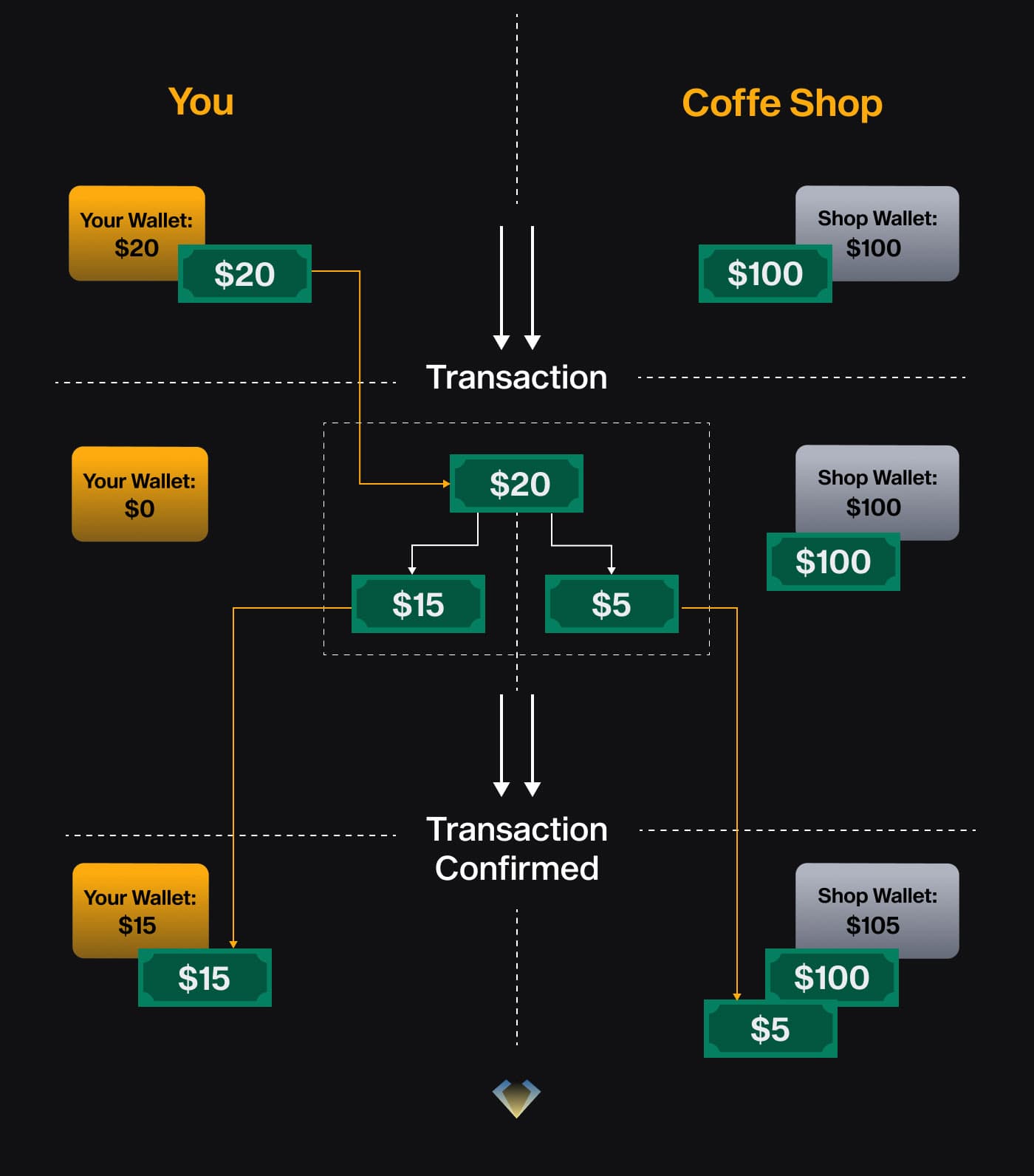
Of course, the numbers must add up between inputs and outputs — if they don’t, the network will reject the transaction.
And, unlike cash, you’re not handing your bill directly to the shop — you’re submitting your transaction to the Bitcoin network to validate and finalize it.
What if You Have More Than One “Bill”?
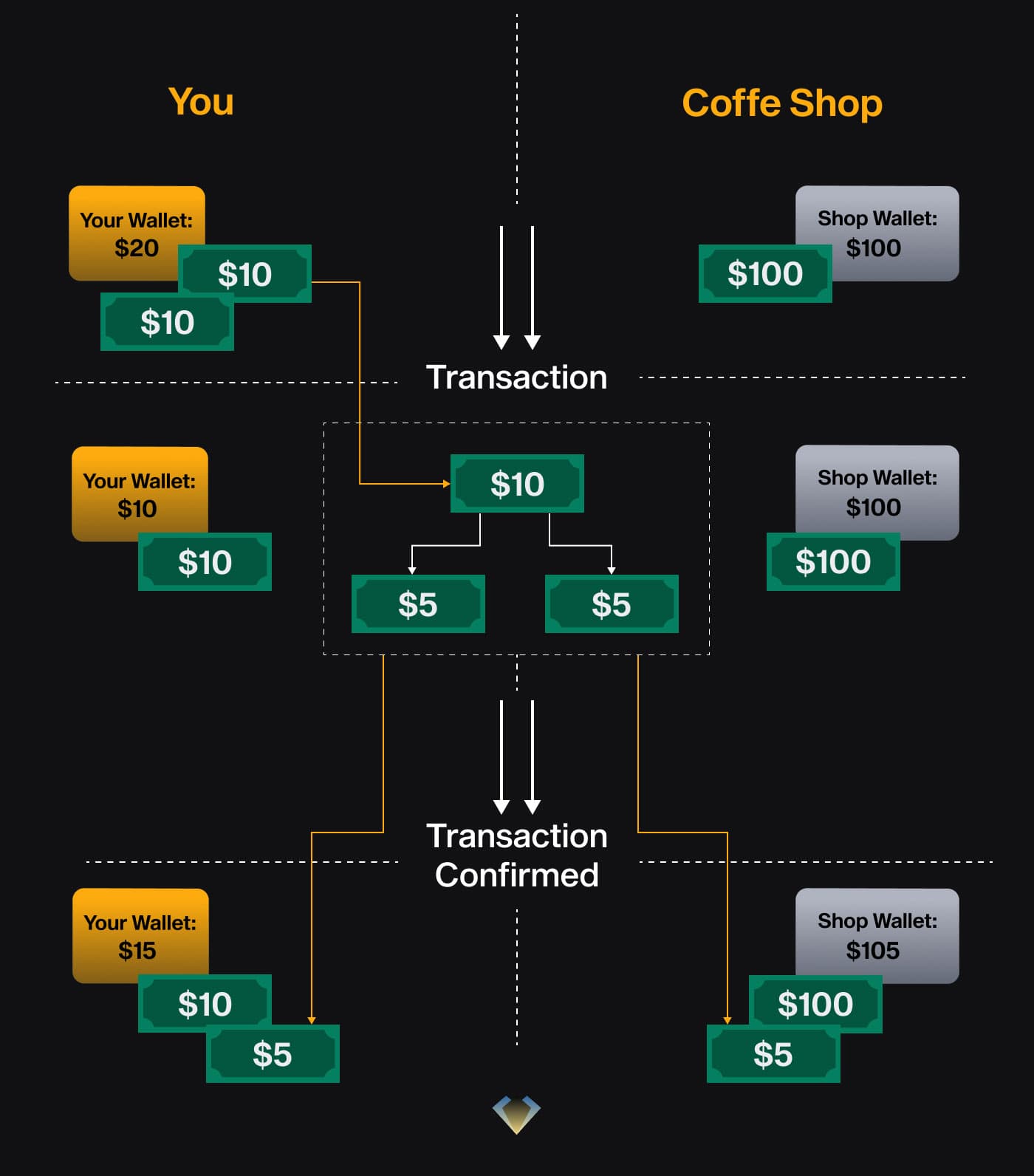
Of course, most wallets contain multiple “bills.” For example, if you have two $10 bills and want to spend $5, your wallet can use just one of them:
- $5 goes to the recipient
- $5 comes back to you as change
- The other $10 bill remains untouched and available for spending
In this case, even while the transaction is pending, you still have $10 available.
Final Note: What About Fees?
Those input “bills” your wallet selects don’t just affect your available balance — they also directly impact the transaction fee you’ll pay. But how are fees actually calculated in Bitcoin?
It’s simple:
Total value of inputs − Total value of outputs = Fee paid to miners
For example, let’s say you use a $10 input: You send $5 to the shop and get $4 back as change. That leaves $1 unaccounted for, which becomes the fee paid to miners.
10$ (input) - (5$ + 4$) (outputs) = 1$ (fee)
But here’s the key: miners prioritize transactions by fee per byte, not just the total fee. And, since each input adds size to the transaction, the number and size of your inputs will directly affect how much you need to pay per byte to get confirmed quickly.
We’ll explore that in the next post — how wallets choose which UTXOs to use, and how input selection strategies impact your fees.
Subscribe To The NGRAVE Academy
Knowledge for all levels. Join our newsletter to receive the latest articles.
By signing up, you agree to receive our marketing offers following our Privacy Policy. You can unsubscribe at any time.